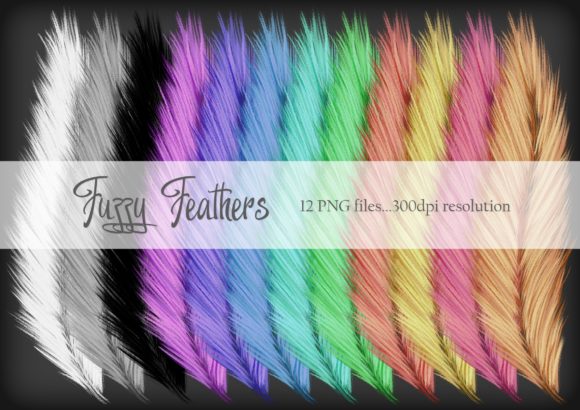
Fuzzy Feathers in Creative Workflows: A Practical Guide for Digital Crafters
Fuzzy Feathers is a collection of 12 digitally drawn files, each rendered at 300 dpi resolution, designed to bring softness, texture, and whimsy into your creative projects. These assets are ideal for card making, scrapbooking, digital crafts, and more. Whether you're a professional designer or an amateur hobbyist, Fuzzy Feathers can be a valuable addition to your toolkit when used thoughtfully and strategically.
Understanding the Role of Fuzzy Feathers in Your Workflow
Fuzzy Feathers should be viewed as a resource that enhances rather than replaces other elements in your creative process. They serve best as decorative accents, background textures, or thematic embellishments. Their use fits naturally into several stages of a project lifecycle, from initial planning to final execution.
Before starting a new project, consider how Fuzzy Feathers might complement your vision. Are you working on a greeting card with a nature theme? A fuzzy feather could add a subtle touch of organic detail. For scrapbooking layouts, these files can help unify disparate elements by providing a cohesive visual thread.
During the design phase, Fuzzy Feathers can act as placeholders or guides for layout and composition. Use them to test spacing, balance, and color harmony before committing to final elements. This approach helps maintain efficiency without sacrificing quality.
After completing the core design, Fuzzy Feathers can be used to refine details, add depth, or enhance storytelling. They work especially well when layered subtly beneath other elements or used as borders and backgrounds.
Integrating Fuzzy Feathers with Other Tools and Resources
Fuzzy Feathers works seamlessly with most digital crafting software, including Adobe Photoshop, Illustrator, Procreate, and Canva. Compatibility is generally high due to their standard file formats (PNG, JPEG, SVG) and high-resolution output.
When using Fuzzy Feathers alongside other assets, it's important to maintain consistency in style and scale. Ensure that colors, line weights, and overall aesthetics align with the rest of your design. This prevents the feathers from appearing out of place or disrupting the visual flow.
For those who rely on templates or pre-designed kits, Fuzzy Feathers can be incorporated as customizable elements. Modify their opacity, size, or placement to suit the specific needs of your project. This flexibility makes them adaptable to various use cases and creative styles.
Consider pairing Fuzzy Feathers with complementary resources such as patterned papers, clip art, or font sets. Together, they can create a rich and layered design that feels intentional and cohesive.
Practical Implementation Tips and Workflow Examples
To maximize the value of Fuzzy Feathers, establish a clear workflow that includes preparation, implementation, and review. Here’s a practical example:
- Preparation: Organize your Fuzzy Feathers files into folders based on category (e.g., "Feathers," "Textures," "Borders"). This simplifies access during the design process.
- Implementation: Use Fuzzy Feathers as background elements or subtle accents. For instance, place a feather along the edge of a card or use one as a border around a photo in a scrapbook layout.
- Review: Step back and assess how the feathers contribute to the overall composition. Adjust their placement or scale if needed to ensure they enhance rather than overwhelm the design.
Another scenario involves using Fuzzy Feathers in a digital collage. Start by arranging primary images and text elements, then layer the feathers in areas where additional texture or visual interest is desired. This method ensures that the feathers support the main content rather than compete with it.
If you're working on a series of cards or social media posts, create a consistent palette and apply Fuzzy Feathers uniformly across all pieces. This reinforces brand identity and creates a sense of continuity.
Factors to Consider for Long-Term Use and Quality Control
For long-term use, invest time in organizing your Fuzzy Feathers library. Label files clearly and categorize them according to function, style, or project type. This practice saves time and reduces frustration when revisiting past work.
Usability is another key factor. Test Fuzzy Feathers in different contexts to understand their versatility. Some may work better as standalone elements, while others are more effective when combined with other textures or patterns.
Consistency is essential when using Fuzzy Feathers across multiple projects. Develop a style guide or set of rules for their application. For example, decide whether to use them only in certain types of projects or limit their use to specific areas within a layout.
Quality control should not be overlooked. Always verify that Fuzzy Feathers files are crisp and free from distortion, especially when scaling them up for print. High-resolution files ensure that they remain visually appealing even at larger sizes.
Finally, consider how Fuzzy Feathers fit into your broader creative ecosystem. Are they being used efficiently, or are they becoming redundant? Regularly evaluate their role in your workflow and adjust accordingly.
Conclusion
Fuzzy Feathers offer a unique opportunity to infuse creativity, texture, and personality into your digital and physical projects. By integrating them thoughtfully into your workflow, you can elevate the visual appeal of your work while maintaining efficiency and organization. Whether you're designing cards, creating digital art, or enhancing a scrapbook layout, Fuzzy Feathers can be a versatile and valuable asset when used with intention and care.