Divider, Flourish, Swirl: A Digital Set for Creative Projects and More
Exploring the Versatility of Divider, Flourish, Swirl Files
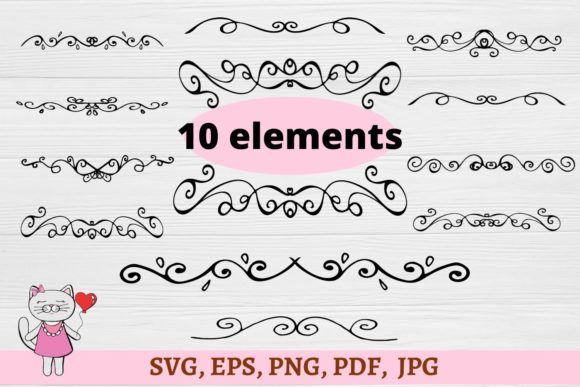
If you're looking to elevate your creative projects with stunning decorative elements, the Divider, Flourish, Swirl digital set is an excellent resource. This downloadable collection includes a wide range of cutout files that can be used for greeting cards, gift tags, flowers, children’s crafts, accessories, banners, scrapbooking, embroidery, textiles, iron-on vinyl shirts and stickers, signs, mugs, wall stickers, and much more. Whether you're a hobbyist or a professional designer, this set provides the tools you need to bring your ideas to life.
What You Get in the Digital Download
The digital download comes as a compressed folder containing multiple file formats, making it compatible with various software and printing methods. Inside, you'll find:
- 10 JPEG files with white backgrounds, high resolution (300 dpi), perfect for printing and use in other programs.
- 10 SVG files designed for use with Silhouette Studio Designer Edition, Cricut Design Space, and Brother Scan N Cut. These files are ideal for making cuts, whether simple or complex.
- 10 EPS files that are fully organized into different layers. These files are customizable in Adobe Illustrator, allowing you to change colors, add text, resize, and more.
- 10 PNG files with transparent backgrounds, suitable for printing and integration into various software products.
- 1 PDF file containing all the high-resolution files at 300 dpi.
Each format has its own unique benefits, ensuring that you can use these files in the way that best suits your project needs.
How to Use the Files for Iron-On Transfers
If you plan on using these files for iron-on transfers, there are a few key steps to follow. First, make sure to read the instructions provided with your transfer paper. It's crucial to click the flip horizontally button before completing the print task. This step ensures that the design will appear correctly when transferred onto fabric or other surfaces.
These files are particularly useful for creating custom iron-on vinyl stickers, shirts, and patches. The versatility of the Divider, Flourish, Swirl set allows you to experiment with different designs and applications, from personalized gifts to promotional items.
Applications Across Different Industries and Crafts
The Divider, Flourish, Swirl digital set is not limited to one type of project or industry. Its wide range of uses makes it suitable for various fields, including:
- Greeting Cards: Add a touch of elegance to your handmade or printed cards with intricate flourishes and swirled patterns.
- Gift Tags: Create unique and eye-catching gift tags that stand out from the rest.
- Children’s Crafts: Use the files to make fun and decorative elements for kids' projects, such as school crafts or birthday decorations.
- Accessories: Incorporate these designs into jewelry, bags, or other accessories for a personalized look.
- Banners: Design beautiful banners for events, parties, or home décor with the help of these versatile files.
- Scrapbooking: Enhance your layouts with detailed divider and flourish elements that add visual interest.
- Embroidery and Textiles: Use the SVG and EPS files to create embroidered designs or textile prints with precision.
- Mugs and Wall Stickers: Transform plain surfaces into artistic masterpieces with the help of these digital cutouts.
No matter what your creative endeavor is, the Divider, Flourish, Swirl set offers something to enhance your work.
Why Choose This Digital Set?
There are several reasons why this digital set stands out among similar resources. One of the most significant advantages is the variety of file formats included. Whether you prefer working with vector graphics, raster images, or printable PDFs, you'll find the right file for your needs.
Additionally, the ability to customize the EPS files in Adobe Illustrator gives users complete control over their designs. You can adjust colors, add text, or resize elements to fit your specific project requirements. This level of customization is invaluable for those who want to create unique and personalized items.
The inclusion of both JPEG and PNG files also adds flexibility, especially when it comes to printing. The white background JPEGs are ideal for traditional printing, while the transparent PNGs are perfect for digital projects or overlays.
Best Practices for Using the Files
To get the most out of the Divider, Flourish, Swirl digital set, consider the following tips:
- Check Software Compatibility: Make sure your design software supports the file types you're using. For example, if you're using Cricut Design Space, ensure that your SVG files are properly formatted.
- Test Prints: Before committing to a large-scale project, do a test print to ensure that the colors and details appear as expected.
- Follow Transfer Instructions: If you're using these files for iron-on transfers, always follow the manufacturer's guidelines for best results.
- Organize Your Files: Keep your downloaded files well-organized so that you can easily access them for future projects.
By following these best practices, you can streamline your workflow and achieve professional-quality results with minimal effort.
Final Thoughts on Divider, Flourish, Swirl
The Divider, Flourish, Swirl digital set is a valuable asset for anyone involved in creative projects. Its wide range of applications, compatibility with various software, and high-resolution quality make it a must-have for designers, crafters, and DIY enthusiasts alike. Whether you're looking to create personalized gifts, decorate your home, or enhance your professional portfolio, this set provides the tools you need to bring your vision to life.